Backend App Quick Start Demo
Use this guide to choose the right Corva backend app type before you start implementing business logic. The most important choice is not the programming language—it is the event that should invoke your app.
Architecture
Corva backend apps sit between a trigger and an output. They receive an event, execute your business logic, and commonly write the result to a dataset for frontend apps, subscriptions, or other backend apps to consume.
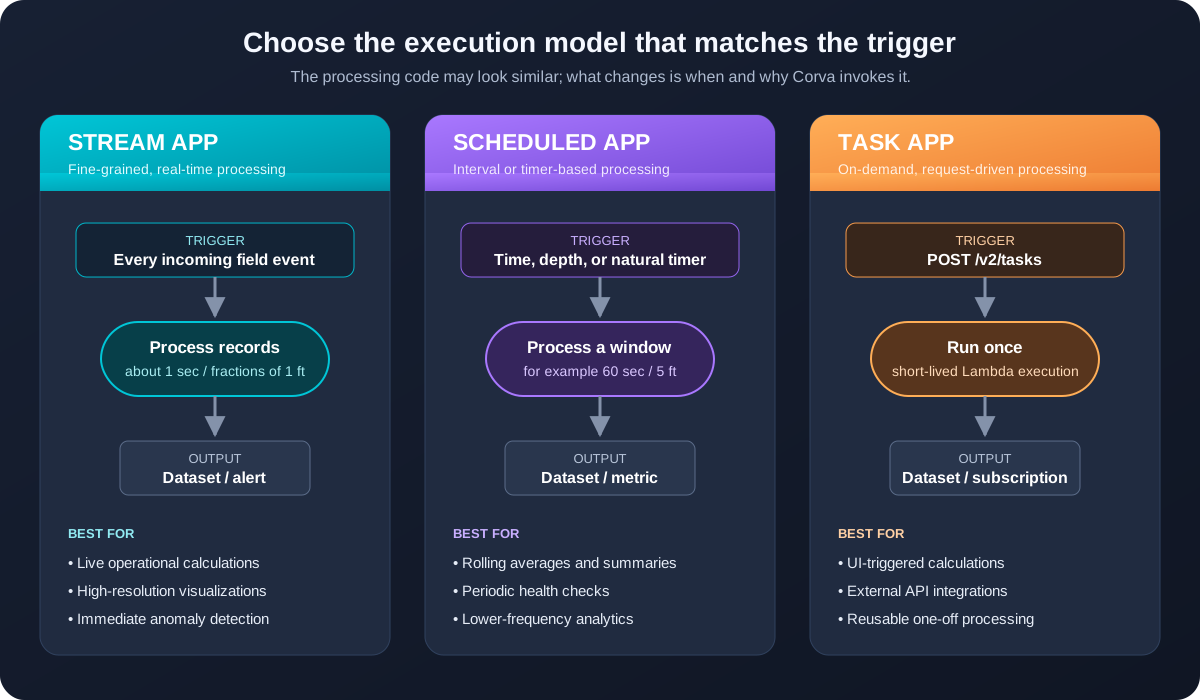
Start with one question: should this logic run for every live record, at an interval, or only after an explicit request?
Compare app types
The execution model determines the app type:
| App type | Invoked by | Asset stream | Typical frequency | Choose it when |
|---|---|---|---|---|
| Stream | Incoming real-time records | Required | About 1 second or fractions of 1 foot | Every fine-grained event matters |
| Scheduled | Data-time, depth, or natural-time interval | Required | For example, 60 seconds or 5 feet | A window or periodic result is enough |
| Task | An API POST request | Not required | On demand | A user or system explicitly requests one execution |
A common mistake is selecting Stream simply because the source data is live. If the result only needs to update every minute, Scheduled usually expresses the requirement more clearly.
Stream apps
Use a Stream app when latency and granularity are central to the feature. Corva invokes it as records arrive from an active time- or depth-based stream.
Good use cases
- Calculate a live drilling indicator for every incoming WITS event.
- Detect an operational condition that needs an immediate alert.
- Feed a high-resolution visualization where one-second or sub-foot changes matter.
Do not choose Stream when
- You only need a rolling summary every few minutes.
- The work should run after a button click or external request.
- Processing every record would add cost without changing the user experience.
Scheduled apps
Use a Scheduled app for periodic or window-based processing. It remains associated with an asset stream, but executes at a configured time or depth interval instead of processing every fine-grained record.
Three scheduling models
- Data time: invoke when a new field-data time interval is available.
- Depth: invoke as the operation advances through configured depth increments.
- Natural time: invoke on a timer, even when the field data timestamp is not advancing.
Good use cases
- Calculate a three-minute rolling average of rate of penetration.
- Generate a summary for every five feet drilled.
- Check equipment or integration health on a timer.
- Periodically enrich and persist data for a dashboard.
Task apps
Use a Task app for explicitly requested, one-off work. It stays dormant until a frontend app, another authorized system, or an external integration sends a request to POST /v2/tasks.
Good use cases
- Run a calculation from parameters entered in a frontend app.
- Import or map data from an external API.
- Move a reusable, memory-intensive operation into its own Lambda.
- Perform a one-time update to a custom dataset.
Task apps are not attached to an asset stream and cannot be tested with App Runner.
Compose a pipeline
More complex products often combine multiple small backend apps. A Stream or Scheduled app can be configured as followable: when it produces data, following apps are triggered to continue the processing chain.
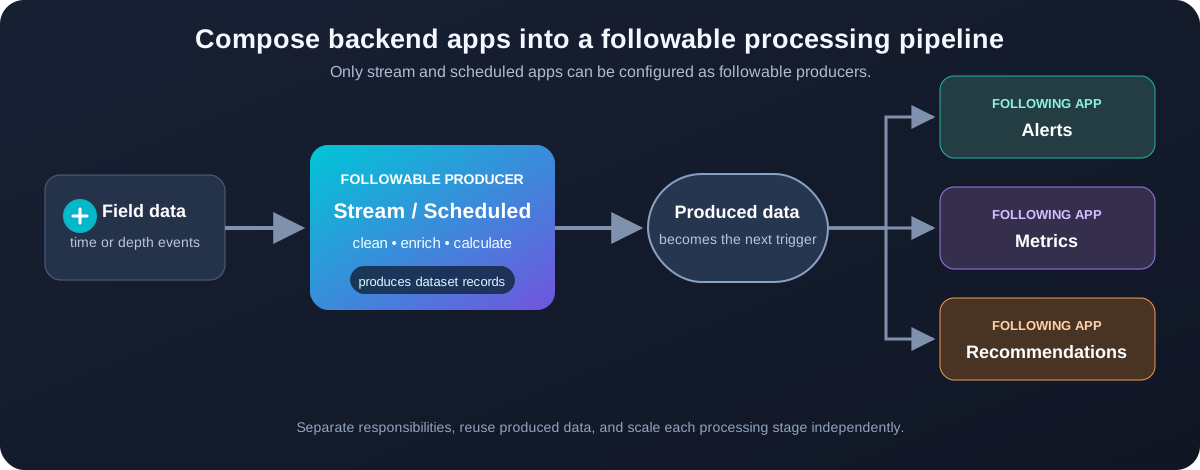
Example
- A Stream app normalizes incoming drilling records.
- Its produced data triggers a Scheduled follow-up calculation.
- Downstream apps independently create metrics, alerts, and recommendations.
- Frontend apps read those outputs from datasets.
This pattern separates responsibilities and lets each stage evolve independently. Only Stream and Scheduled apps can be made followable.
Choose your app
Use this short decision sequence:
- Does execution begin with an API request, button click, or external system?
Choose Task. - Otherwise, must every fine-grained live event be processed immediately?
Choose Stream. - Can the result be calculated at a time/depth interval or on a timer?
Choose Scheduled. - Does one processing stage need to trigger other independent stages?
Consider a followable Stream or Scheduled pipeline.
| Scenario | Recommended type |
|---|---|
| Immediate stick-slip indicator from every WITS record | Stream |
| Average ROP calculated every three minutes | Scheduled |
| NPV calculation requested from a frontend form | Task |
| Raw data → enrichment → alerts and recommendations | Followable pipeline |
Once you have selected the execution model, continue with the Backend Getting Started guide to create and deploy the app.